
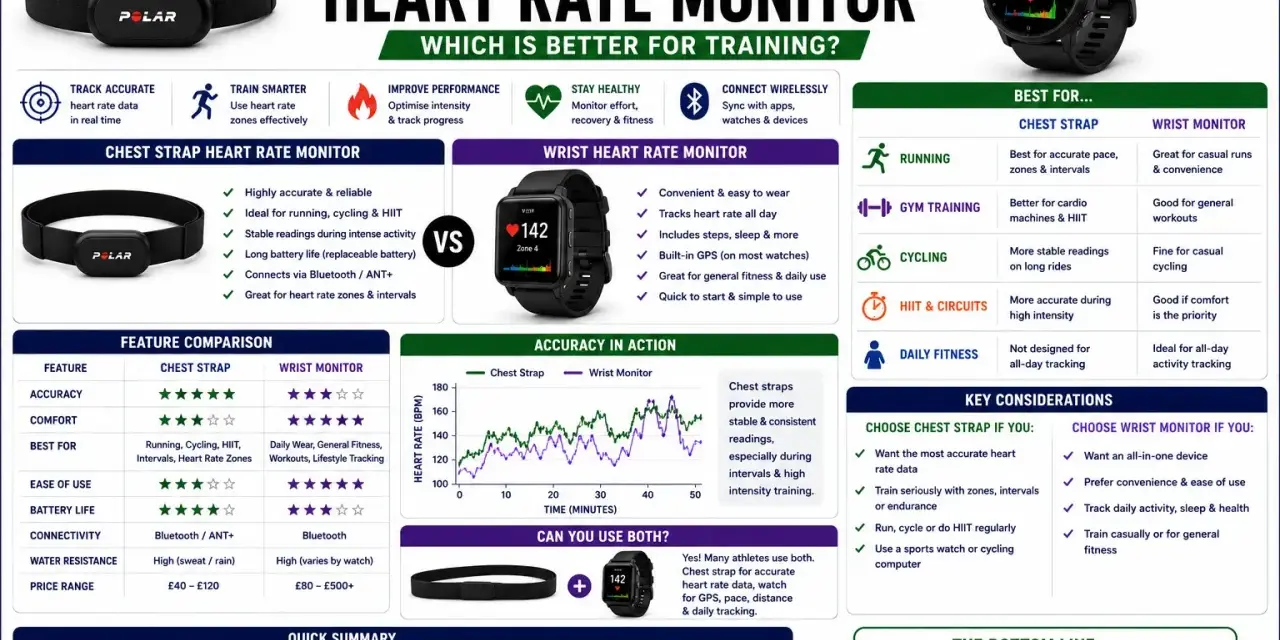
Heart rate data only becomes useful when you know what the device is actually measuring and where it can go wrong. Understanding how heart rate monitors work helps you choose the right sensor, read the numbers correctly, and avoid blaming the device for a fit or motion problem. For cyclists and other training-minded athletes, that difference matters more than most product pages admit.
The core difference is simple: chest straps read the heart’s electrical signal, and wrist sensors estimate pulse with light
- Chest straps use electrodes and are usually the most responsive option for intervals and hard rides.
- Wrist and arm sensors use LEDs plus a photodiode to track blood-flow changes under the skin.
- Motion, loose fit, dry skin, cold weather, and poor contact can distort the reading.
- For cycling workouts where precision matters, I trust a chest strap more than a wrist device.
- For daily wear and easy setup, optical wearables are more convenient and often good enough.
The two sensing methods behind heart rate monitors
Most consumer heart rate monitors do one of two jobs. A chest strap reads the tiny electrical changes created by each heartbeat, which is why it is often called an ECG-based monitor. A wrist or arm device uses optical heart rate tracking, usually shortened to PPG, and estimates pulse by watching how much light is absorbed or reflected as blood volume changes beneath the skin.
In plain English, the chest strap listens to the heart’s signal directly, while the optical sensor watches the pulse wave that follows the beat. That distinction explains almost everything else about accuracy, comfort, and why different devices behave differently during the same workout.
| Device type | What it measures | Main strength | Main trade-off |
|---|---|---|---|
| Chest strap | Electrical activity from the heart | Fast response and strong performance during intense efforts | Less comfortable for some athletes and needs skin contact |
| Wrist sensor | Light changes caused by blood flow under the skin | Very convenient for all-day wear | More vulnerable to motion and fit issues |
| Arm-band optical sensor | Light changes at the upper arm or forearm | Often steadier than the wrist with less bulk than a strap | Still optical, so it can drift in fast or bouncy movement |
That table is the big picture. Once you know which sensor is reading what, the next question is how that raw signal becomes a simple bpm number.
How the signal becomes a heart rate number
The device does not just “know” your heart rate. It samples a stream of data, looks for repeating peaks, measures the time between beats, and converts that interval into beats per minute. If the gap between beats gets shorter, the bpm goes up. If the gap gets longer, the bpm comes down.
Modern monitors also do a lot of cleanup in the background. They smooth brief spikes, filter out noise, and often use short rolling averages so the display does not jump around every second. That is useful, but it also means the number on your wrist or bike computer is sometimes a slightly processed version of the raw signal, not a perfect instant snapshot.
One detail worth knowing: heart rate variability, or HRV, is not the same thing as heart rate. HRV describes the variation between beats, and some training platforms use it to estimate recovery or stress. It can be very informative, but it is a separate signal from the basic bpm reading most people watch during workouts.
That processing helps the display feel stable, but it also explains why fit and motion can make two devices disagree in the real world.

Why placement and motion change the reading
This is where most accuracy complaints come from. A chest strap needs consistent contact with the skin, and optical sensors need a steady relationship with the tissue underneath them. If the sensor moves, the signal gets polluted by motion artifacts, which is just the technical way of saying the device is seeing your movement as well as your pulse.
For chest straps, the usual problems are simple: the strap is too loose, the electrode area is dry, or the sensor sits in the wrong place on the chest. Sweat actually helps the signal once you are warmed up because it improves conductivity, but at the start of a ride or run, dry skin can make the reading jumpy. Static from synthetic jerseys can also add noise, which is why a snug fit matters more than people think.
For wrist sensors, the biggest issue is movement. A cycling position keeps your hands on the bars, your wrist flexed, and your forearms under constant vibration. That can be enough to confuse the light sensor, especially during intervals when the heart rate is changing quickly. Cold weather can make it worse because blood flow near the skin is lower, so the optical signal is weaker.
In practice, I think of the wrist as the convenience option and the chest as the precision option. That leads naturally to the real question: which one fits the kind of training you actually do?
Which monitor fits which workout
For cyclists, the best choice depends less on the brand and more on the session. A steady endurance ride is a very different problem from repeated sprints or threshold work, and the monitor you trust should match the session you are trying to control.
| Workout | Best choice | Why it works |
|---|---|---|
| Zone 2 endurance ride | Wrist or chest strap | The effort changes slowly, so small delays are less of a problem. |
| Intervals and sprints | Chest strap | It reacts faster when your effort jumps and drops quickly. |
| Indoor trainer sessions | Chest strap or upper-arm optical | Stable body position helps, but a strap still gives the cleanest data. |
| Recovery rides and all-day wear | Wrist sensor | Comfort and convenience matter more than split-second precision. |
| Strength training | Chest strap or arm band | Wrist bending and gripping can make the wrist reading messy. |
I usually tell riders to think in terms of decisions, not just data. If you are trying to hold a steady aerobic zone, almost any decent monitor can help. If you are trying to pace repeat efforts or compare threshold sessions, the cleaner signal from a chest strap is usually worth the extra buckle and strap.
There is also a battery and maintenance angle here. Chest straps often run for months on a coin cell, while wrist devices usually need charging more often because they power a screen, sensors, and connectivity all day. That trade-off is real, and it matters if you ride long days or travel with limited charging options.
With the right setup, either device can work well. The next step is getting better readings from the monitor you already own.
How to get cleaner readings from any monitor
Most heart rate problems are setup problems, not hardware failures. A few small habits usually make a bigger difference than upgrading to a more expensive model.
- For a chest strap, wet the electrode area before starting and tighten it so it stays flat against the skin.
- Position the strap consistently on the chest instead of letting it slide during warm-up.
- Keep the strap clean, because sweat and dried salt can weaken contact over time.
- For a wrist device, wear it a little above the wrist bone and snug enough that it does not slide.
- Wait a few minutes into the workout before judging accuracy, especially if you start cold or dry.
- Use power, pace, or perceived exertion as a cross-check when the heart rate looks odd.
One practical rule I use: if the number looks wrong, fix the fit before assuming your physiology has changed. That simple habit prevents a lot of false alarms, especially during interval work where every reading feels important.
For cyclists, I would add one more point. Heart rate is best used as a trend tool, not a verdict. On a windy outdoor ride, a hot indoor trainer session, or a recovery day after poor sleep, the same power output can produce very different heart rate responses. That is normal, and it is part of why the metric is useful.
What I would choose for most cyclists and fitness sessions
If I wanted the cleanest data for hard rides, intervals, and structured training blocks, I would choose a chest strap. If I wanted the easiest all-day option for commuting, casual rides, and general fitness tracking, I would choose a wrist monitor. If I wanted a middle ground, I would look at an upper-arm optical sensor before overpaying for a feature set I would never use.
The practical takeaway is simple: pick the sensor you are most likely to wear consistently, then fit it correctly. Consistency gives you better trends, and better trends make training decisions easier than chasing a single perfect number. For most riders, that is the real answer behind the technology.
